
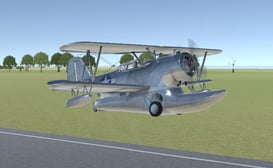
3D Flight Simulator

3D Flight Simulator
About 3D Flight Simulator
Welcome to the ultimate browser-based aviation experience. This 3D Flight Simulator places you in the cockpit of a highly responsive aircraft, offering a perfect blend of realistic flight physics and accessible, fun gameplay. Soar over sprawling islands, navigate through mountain ranges, and fly under bridges as you test your piloting skills. The game features intuitive controls that are easy to learn but challenging to master, providing endless entertainment for both casual players and flight enthusiasts. With its smooth 3D graphics and dynamic day-night cycle, every flight feels unique and engaging. Whether you are performing barrel rolls, attempting precise landings, or simply enjoying a peaceful cruise, this simulator delivers a captivating aerial adventure that you can enjoy anytime, anywhere.
Features of 3D Flight Simulator
- ✓Realistic 3D flight physics and responsive aircraft controls for an authentic piloting feel
- ✓Stunning open-world environments with detailed islands, mountains, and oceans to explore
- ✓Dynamic weather and day-night cycle that changes the conditions of your flight
- ✓Multiple camera angles, including cockpit view, to fully immerse yourself in the 3D Flight Simulator experience
- ✓Challenging objectives and stunt rings to test your precision flying and aerial maneuver skills
- ✓Smooth performance and optimized graphics for seamless gameplay directly in your web browser
How to Play 3D Flight Simulator
Use the W, A, S, D or Arrow keys to control the pitch, roll, and yaw of your aircraft.
Adjust your throttle with the Shift and Ctrl keys to control your speed for takeoffs, landings, and stunts.
Navigate through the floating rings and complete aerial challenges to master the 3D Flight Simulator.
Pro Tips of 3D Flight Simulator
Use gentle control inputs for smooth flying, especially when attempting to navigate through tight stunt rings.
Master your landing approach by reducing throttle early and using your pitch to control your descent rate for a perfect touchdown.
In the 3D Flight Simulator, you can use the roll and yaw controls together to perform coordinated turns and avoid losing altitude.
Practice flying in the cockpit view to improve your spatial awareness and get the most immersive experience.
When performing aerobatic stunts, make sure you have plenty of altitude to recover safely if you lose control.
Explore the entire map to discover all the hidden challenges and the best scenic routes for a relaxing flight.
Player Feedback on 3D Flight Simulator
This is the most fun I have had with a browser flight game. The controls are spot on and the sense of speed is incredible. I can play for hours.
For a free simulator, the level of detail is impressive. Flying through the canyon and under the bridge never gets old. A fantastic 3D Flight Simulator.
Very easy to pick up and play. The graphics are smooth and the objectives give you something to work towards. I just wish there were more plane models.
The physics feel great. You can really tell the difference between a gentle turn and a hard bank. A superb job on the flight model.
Love the open world to explore. It is very relaxing to just fly around. The day to night transition is a beautiful touch.
Performing barrel rolls and flying through the rings is so satisfying. The game is challenging but fair. Highly recommended for anyone who likes flying games.
Runs perfectly on my laptop with no downloads required. This is my go-to game when I have a few minutes to spare. Fantastic simulation.
A solid and enjoyable flight sim. The cockpit view adds to the immersion. I would love to see different weather challenges added in the future.
FAQs about 3D Flight Simulator
What are the controls for the game?
You control the aircraft primarily with the W, A, S, D or Arrow keys. The Shift key increases throttle, and the Ctrl key decreases throttle. The C key cycles through different camera views.
Is there an objective or goal in the game?
Yes. The main goal is to fly through a series of floating rings scattered across the map. You can also challenge yourself with precise landings and exploring the entire island environment.
Can I play this game on a mobile device or tablet?
This version of the 3D Flight Simulator is designed for desktop browsers with a keyboard. It is not optimized for touchscreen controls on mobile devices.
Do I need to download anything to play?
No, you do not. This is a completely free, browser-based game. You can start playing instantly without any downloads or installations.
Why is my plane crashing on takeoff?
A common mistake is applying full throttle (Shift) without gently pulling back on the pitch (S or Down Arrow) to lift the nose. Apply throttle gradually and pull back gently to achieve a smooth takeoff.
How do I perform a barrel roll or other stunts?
To perform a barrel roll, you need to combine roll (A or D) and pitch (W or S) controls while maintaining your throttle. Practice in open air with plenty of altitude first.
Is there a way to reset my plane if I crash or get stuck?
Yes, you can press the R key at any time to instantly reset your aircraft to a safe position in the air above the starting airport.
What does the different camera views offer?
The game offers several views: a third-person chase camera, a cockpit view for immersion, and a free-look camera. You can cycle through them with the C key to find your preferred perspective.
Are there any other aircraft to unlock or choose from?
In this version of the simulator, there is one primary aircraft model designed to offer a balanced and responsive flying experience across all activities.
Is the game suitable for young children?
Yes, the 3D Flight Simulator is family-friendly. It contains no violence or inappropriate content. The controls may require some practice for younger players, but it is a safe and enjoyable experience for all ages.